Enjoy Photos/Audio/Video Stored on a USB Device
You have some ways to enter Media:
- Insert a USB device, a prompt message appears, press
 /
/ to open it.
 - Press
 button to select from your Apps list on home page.
 - Press
 button to select
Then select
Select the content you want to play on the screen, like pictures, videos and music.
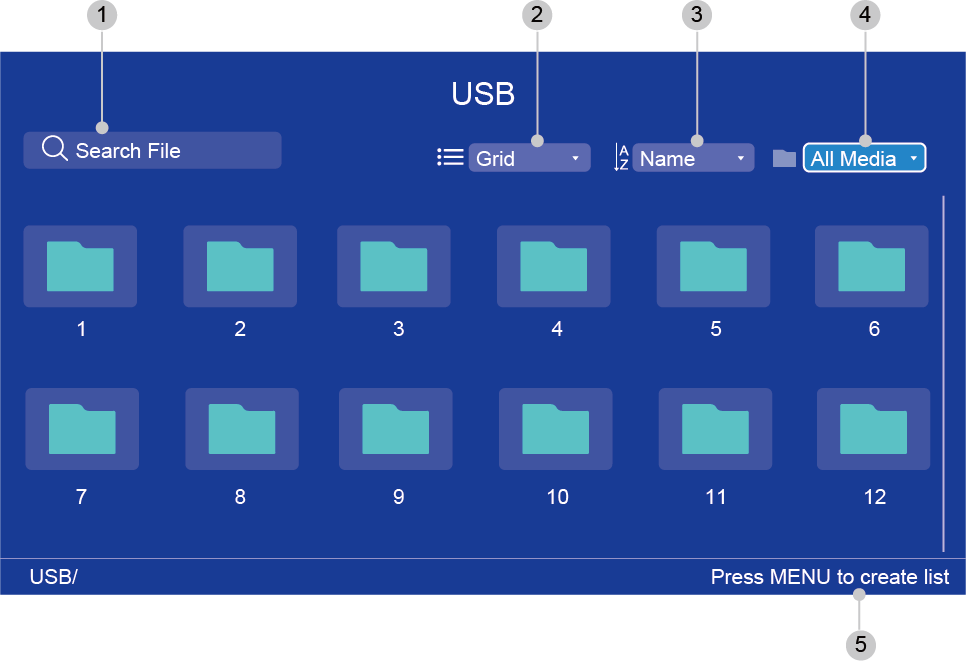
| 1 | Search the content you want to play. |
| 2 | Arrange the content list by , . |
| 3 | Sort the content list by , , . |
| 4 | Filter the content list by , , , . |
| 5 | Create a photo, music, or video playlist. |
Note:
- Some options in the above table may not be available in some models/countries/regions.
The image is only for reference and may differ from the actual product.
You must obtain any required permission from copyright owners to download or use copyrighted content. Manufacturer cannot and does not grant such permission.