Enjoy Photos/Audio/Video Stored on a USB Device
You have some ways to enter Media:
- Insert a USB device, a prompt message appears, press
 to open it.
 - Press
 button to select from your Apps list on home page.
 - Press
 button to select .
Then select .
Select the content you want to play on the screen, like pictures, videos and music.
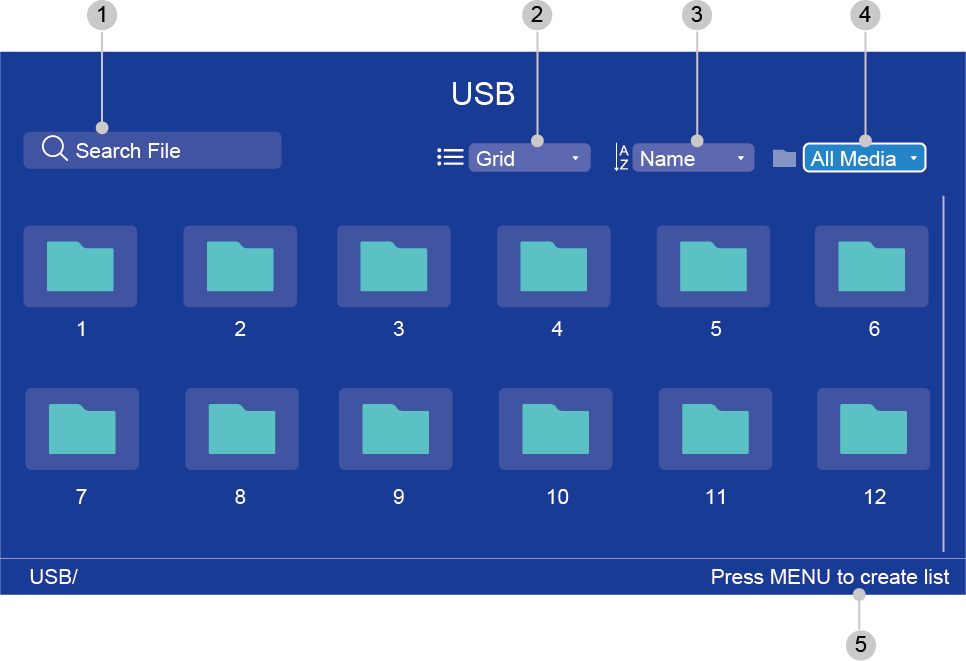
| 1 | Search the content you want to play. |
| 2 | Arrange the content list by , . |
| 3 | Sort the content list by , , . |
| 4 | Filter the content list by , , , . |
| 5 | Create a photo, music, or video playlist./Press LEFT button to browse the connected devices. /Press MENU button to edit. |
Note:
- Some options in the above table may not be available in some models/countries/regions.
The image is only for reference and may differ from the actual product.